Google
 
Showing posts with label XNA. Show all posts

Thursday, October 04, 2007

Generic XNA - A.I Finite State Machine

I have a great book Programming Game AI By Example by Mat Buckland. The first chapter was an eye opener for me as it is a Maths and Physics Primer which is just what I needed, I have not used either of those parts of my Brain since 1988 and they are a bit whithered :P

Anyway I digress. The next chapter is on Finite State Machines (FSM), I have a little experience of these having played with writing very simple CA's (Cellular Automata) way back when.

So I thought, "I have not seen any examples for A.I in XNA yet, wouldn't it be nice, using the examples in this book to come up with a FSM A.I for XNA" So that is what I have tried to do here in this post.

The basic model I put forward here IMHO is quite extensible, you have two base class's and an interface, the BaseAgent, BaseState and IBaseAgent. These objects are the framework of the FSM, to create a new Agent just inherit from the BaseAgent and create an agent interface to go with you new Agent class off the back of IBaseAgent and create your new states inheriting from the BaseState for each, then have your None Player Character or Bot (NPC) inherit from the new interface and write your AI logic for your NPC in the interface stubs.

In this example project I have just implemented the base states:

Patrol
Fight
Flee
isSafe
runAway


I guess these are the most basic items an NPC will need, you can always add other states like Seek and Chase or anything else you may need your NPC to do.


The NPC Patrols...


The NPC Fights!


The NPC Flees!


Again, this is a simple example, but I hope it gives you a base to work from and develop your own FSM's and as ever, if you think I am going about it wrong, leave a comment, it's the only way I can improve my examples.

Controls
AWSD - Translate Camera
Mouse - Rotate camera.

Move to the plane while it is patrolling in a circle, it will engage you and once it has lost enough hits will flee (don't worry, it loses hits just by being close to you)

GenericXNAExampleAIFSM.zip

Tuesday, October 02, 2007

Generic XNA - Ocean Shader


I have moved this shader and it's associated class over to a generic XNA class. This should make it easier to bolt into your own projects should you not want to use the Randomchaos3DEngine as your base.

See this post for reference: Source Example 5 - Ocean

GenericXNAOceanExample.zip

Generic XNA - Under Water Post Process Effect


I guess the idea for this came from Bioshock, a few weeks a go a friend of mine asked if it was possible for my to create an underwater post process effect for him (thanks for the idea Dave). I already had a shader from Microsoft (can't remember where I got it) that I used for a nice ripple effect on 2D images, so I thought I should be able to adapt that to do this effect. And that is exactly what I have done with this.

It is not perfect as I am using a shader that was not intended for this effect, but it gives you an idea of how to go about doing it.

Here is a shot of the shader being used as intended on a background image.


The post processing code in this sample is all thanks to Chr0n1x, with out his tutorial written for the HazyMind Engine I would not have a clue how to create post processing effects.

Controls
Esc - Exit
AWSD - Translate Camera
Mouse - Rotate Camera

GeneralXNAUnderWaterPP.zip

Monday, October 01, 2007

Generic XNA - Content Pipeline Mod


I have a few examples using custom pipeline code on here, now an issue I get a lot, mainly because I have next to no modeling skills, is when I try to use a new model that has been UV'd I get compile errors because the UV texture that is embedded in the model file is not present or in the right place. So I have to find the texture file reference in the model file and remove it, but some times the models are not plain text so I have to find the physical texture file (or create a dummy) put it in the right place then compile again.

Now I find this a real pain in the back side, I also then have textures in my projects I may not want to use if I cant pull them out of the model file. So I have found a nice simple solution to my problem, override the ConvertMaterial method in the ModelProcessor and just ignore any texture exceptions.

Here is the code to do it

       protected override MaterialContent ConvertMaterial(MaterialContent material, ContentProcessorContext context)
       {
           try
           {
               return base.ConvertMaterial(material, context);
           }
           catch
           {
               return null;
           }
       }


I have not put a code sample up for this as it is pretty simple to do, if you like try it out on one of the pipeline processors here.

Wednesday, September 19, 2007

Generic XNA - Bump/Normal Mapping


Now I have had a hell of a game with this in the past and have now come across a few people who have had the same or similar issues that I have had. So I have decided to put up and example of how to do this. The example given on the Creators Club is great, but relies on you embedding your textures in the mesh you intend to bump. This is all fine, but if you have one model and you want to apply different textures to different instances of it then this method is limiting.

So I have decided to post up my code to do this. Now as I said before, I have had a right load of trouble with this right from the start, you can see my tales of woe on the HazyMind forum and on the XNA Creators Club forum, as usual a HUGE thanks goes out to Leaf from the XNA UK User Group

So my initial issue was that I didn't know that certain model formats do not come with tangent data in them, at least that is what I am told. So I started off trying to apply my shader to an X formated mesh and got some really odd results (see the HazyMind posts), after much time and with the release of Benjamin Nitschke's book on XNA I found out thanks to the guys on the HM forum that you have to pass the model through a custom content importer and generate your tangent data there.

So I added to my existing custom model content pipeline, but did not get the method of generating the Tangent data correctly. Now this gave rise to some really odd results, basically the models would have my old issue when I did not have my bumped terrain in the draw call, but one it was drawn it got the effect rendered correctly. This was because before the terrain was rendered there was just random data in the Tangent Chanel that was being passed to the shader, once it was drawn and by sheer luck the tangent data from the terrain object just happened to sit in the same memory location as the unassigned tangent data for the model, so giving the illusion of the bump effect. So when my applications were ran on other systems the bump effect just did not work.

Here is and example of a custom content pipleine class for the model to be bumped

using System;
using System;
using System.IO;
using System.Collections.Generic;
using Microsoft.Xna.Framework;
using Microsoft.Xna.Framework.Audio;
using Microsoft.Xna.Framework.Graphics;
using Microsoft.Xna.Framework.Input;
using Microsoft.Xna.Framework.Storage;
using Microsoft.Xna.Framework.Content;
using Microsoft.Xna.Framework.Content.Pipeline;
using Microsoft.Xna.Framework.Content.Pipeline.Graphics;
using Microsoft.Xna.Framework.Content.Pipeline.Processors;
using Microsoft.Xna.Framework.Content.Pipeline.Serialization.Compiler;

namespace CustomContentPipeline
{    
   [ContentProcessor]    
   public class MyModelProcessor : ModelProcessor    
   {        
       double minX = double.MaxValue;
       double minY = double.MaxValue;
       double minZ = double.MaxValue;
       double maxX = double.MinValue;
       double maxY = double.MinValue;
       double maxZ = double.MinValue;
       
       List<BoundingBox> boxes = new List<BoundingBox>();
       List<List<Vector3>> MeshVerts = new List<List<Vector3>>();
       
       object[] ModelData = new object[2];
       
       // Bounding Box's
       private void CheckNode(NodeContent content)
       {
           foreach (NodeContent o in content.Children)
           {
               if (o is MeshContent)
               {
                   // Get VertData
                   GetAllVerticies((MeshContent)o);
                   BoundingBox bb = new BoundingBox();

                   minX = double.MaxValue;
                   minY = double.MaxValue;
                   minZ = double.MaxValue;
                   maxX = double.MinValue;
                   maxY = double.MinValue;
                   maxZ = double.MinValue;
                   
                   MeshContent mesh = (MeshContent)o;
                   foreach (Vector3 basev in mesh.Positions)
                   {
                       Vector3 v = basev;

                       if (v.X < minX)
                           minX = v.X;
                       
                       if (v.Y < minY)
                           minY = v.Y;
                       
                       if (v.Z < minZ)
                           minZ = v.Z;
                       
                       if (v.X > maxX)
                           maxX = v.X;
                       
                       if (v.Y > maxY)
                           maxY = v.Y;
                       
                       if (v.Z > maxZ)
                           maxZ = v.Z;
                   
                   }
                   
                   double lenX = maxX - minX;
                   double lenZ = maxZ - minZ;
                   double lenY = maxY - minY;

                   bb.Min = new Vector3((float)minX, (float)minY, (float)minZ);
                   bb.Max = new Vector3((float)maxX, (float)maxY, (float)maxZ);
                   boxes.Add(bb);
               }
               else
                   CheckNode(o);
           }
       }
       
       // Vertex positions
       private void GetAllVerticies(MeshContent mesh)
       {
           for (int g = 0; g < mesh.Geometry.Count; g++)
           {
               GeometryContent geometry = mesh.Geometry[g];
               
               List<Vector3> temp = new List<Vector3>();
               
               for (int ind = 0; ind < geometry.Indices.Count; ind++)
               {
                   // Transforms all of my verticies to local space.
                   Vector3 position = Vector3.Transform(geometry.Vertices.Positions[geometry.Indices[ind]], mesh.AbsoluteTransform);
                   temp.Add(position);
               }
               MeshVerts.Add(temp);
           }
       }        
       // Tangents.
       private void GenerateTangents(NodeContent input, ContentProcessorContext context)
       {
           MeshContent mesh = input as MeshContent;
           
           if (mesh != null)
           {
               MeshHelper.CalculateTangentFrames(mesh,
                   VertexChannelNames.TextureCoordinate(0),
                   VertexChannelNames.Tangent(0),
                   VertexChannelNames.Binormal(0));
           }
           
           foreach (NodeContent child in input.Children)
           {
               GenerateTangents(child, context);
           }
       }        
       // Normals
       private void GenerateNormals(NodeContent input, ContentProcessorContext context)
       {
           MeshContent mesh = input as MeshContent;
           
           if (mesh != null)
           {
               MeshHelper.CalculateNormals(mesh, true);
           }
           
           foreach (NodeContent child in input.Children)
           {
               GenerateNormals(child, context);
           }
       }
       
       public override ModelContent Process(NodeContent input, ContentProcessorContext context)
       {
           // Calculate Mesh Tangents.
           GenerateNormals(input, context);
           
           // Calculate Mesh Normals.
           GenerateTangents(input, context);
           
           // Setup bounding box data.
           CheckNode(input);
           
           ModelData[0] = boxes;
           ModelData[1] = MeshVerts;

           ModelContent basemodel = base.Process(input, context);
           basemodel.Tag = ModelData;
           return basemodel;
       }
   }
}


The relevant method here is my GenerateTangent method:

       // Tangents.
       private void GenerateTangents(NodeContent input, ContentProcessorContext context)
       {
           MeshContent mesh = input as MeshContent;
           
           if (mesh != null)
           {
               MeshHelper.CalculateTangentFrames(mesh,
                   VertexChannelNames.TextureCoordinate(0),
                   VertexChannelNames.Tangent(0),
                   VertexChannelNames.Binormal(0));
           }
           
           foreach (NodeContent child in input.Children)
           {
               GenerateTangents(child, context);
           }
       }


GenericExampleBumpNormalMapping.zip

Friday, August 17, 2007

Generic XNA - SM3 Fog


So here is the SM3 (Shader Model 3) HLSL fog. Now this is taken pretty much 99% from Leaf's example, but thought I would comment on how easy this technique is to put into your existing shaders.

I also found that adding this to a shader pushes the operation count up a fair bit, the limit in SM2 is 64 operations per shader, so 128 in all, 64 in the Vertex Shader and another 64 in the Pixel Shader. So What I did was put the fog code into a second pass so giving me another 64x64 operation slots to play with.
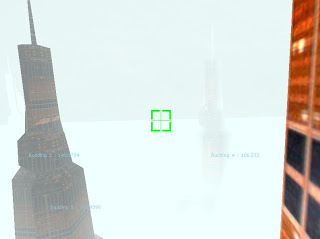


So here are the shaders:

This first shader is the one used for the buildings you see in the shots, it is a single pass and a simple texture shader.

ShaderFog.fx

float4x4 World : World;
float4x4 WorldViewProject : WorldViewProjection;
float3 EyePosition : CameraPosition;
texture thisTexture;
float3  LightPos  = (0,-1,0);

float4 ambient = {0.25, 0.25, 0.25, 1.0};
float4 diffuse = {1.0, 1.0, 1.0, 1.0};
float4 specularColor = {0.2, 0.2, 0.2, 1.0};
float shininess = 40;

float fogNear = 10;
float fogFar = 100;
float fogAltitudeScale = 10;
float fogThinning = 100;
float4 fogColor = {0.5, 0.5, 0.5, 1.0};

sampler TextureSampler = sampler_state
{
   Texture = <thisTexture>;
};

struct VS_INPUT
{
   float4 Position : POSITION0;
   float2 Texcoord : TEXCOORD0;
   float3 Normal : NORMAL0;
};

struct VS_OUTPUT
{
   float4 Position : POSITION;
   float2 Texcoord : TEXCOORD0;
   float3 Normal : TEXCOORD1;    
   float3 WorldPos : TEXCOORD2;
};
struct PS_INPUT
{
   float4 Position : TEXCOORD4;
   float2 Texcoord : TEXCOORD0;
   float3 Normal : TEXCOORD1;    
   float3 WorldPos : TEXCOORD2;
};

float4 blinn2(
       float3 N,
       float3 L,
       float3 V,
       uniform float4 diffuseColor,
       uniform float4 specularColor,
       uniform float shininess)
{
   float3 H = normalize(V+L);
   float4 lighting = lit(dot(L,N), dot(H,N), shininess);
   return diffuseColor*lighting.y + specularColor*lighting.z;
}


VS_OUTPUT Transform(VS_INPUT Input)
{
   VS_OUTPUT Output;

   Output.WorldPos = mul(Input.Position,World);
   Output.Position = mul(Input.Position, WorldViewProject);
   Output.Texcoord = Input.Texcoord;
   Output.Normal = mul(Input.Normal,World);

   return Output;
}

float4 Texture(PS_INPUT Input) : COLOR0
{
   float4 colorMap = tex2D(TextureSampler, Input.Texcoord.xy) * 1.5;
   float3 N = normalize(Input.Normal);
   float3 V = normalize(EyePosition - Input.WorldPos);
   float3 L = normalize(LightPos - Input.WorldPos);
   
   float4 C = ambient*colorMap;
   
   C += blinn2(N, L, V, colorMap * diffuse, specularColor * colorMap.a, shininess);
   float d = length(Input.WorldPos - EyePosition);
   float l = saturate((d - fogNear) / (fogFar - fogNear) / clamp(Input.Position.y / fogAltitudeScale + 1, 1, fogThinning));
   return lerp(C, fogColor, l);    
};

technique TransformTexture
{
   pass P0
   {
       VertexShader = compile vs_1_1 Transform();
       PixelShader  = compile ps_2_0 Texture();
   }
}


This is the shader I use for the floor tile, again this is a single pass. Just a variation on the theam really.

Floor.fx

float4x4 World : World;
float4x4 WorldViewProject : WorldViewProjection;
float3 EyePosition : CameraPosition;
texture thisTexture;
float3  LightPos  = (0,-1,0);

float4 ambient = {0.25, 0.25, 0.25, 1.0};
float4 diffuse = {1.0, 1.0, 1.0, 1.0};
float4 specularColor = {0.2, 0.2, 0.2, 1.0};
float shininess = 0;

float fogNear = 10;
float fogFar = 100;
float fogAltitudeScale = 10;
float fogThinning = 100;
float4 fogColor = {0.5, 0.5, 0.5, 1.0};

sampler TextureSampler = sampler_state
{
   Texture = <thisTexture>;
};

struct VS_INPUT
{
   float4 Position : POSITION0;
   float2 Texcoord : TEXCOORD0;
   float3 Normal : NORMAL0;
};

struct VS_OUTPUT
{
   float4 Position : POSITION;
   float2 Texcoord : TEXCOORD0;
   float3 Normal : TEXCOORD1;    
   float3 WorldPos : TEXCOORD2;
};
struct PS_INPUT
{
   float4 Position : TEXCOORD4;
   float2 Texcoord : TEXCOORD0;
   float3 Normal : TEXCOORD1;    
   float3 WorldPos : TEXCOORD2;
};

float4 blinn2(
       float3 N,
       float3 L,
       float3 V,
       uniform float4 diffuseColor,
       uniform float4 specularColor,
       uniform float shininess)
{
   float3 H = normalize(V+L);
   float4 lighting = lit(dot(L,N), dot(H,N), shininess);
   return diffuseColor*lighting.y + specularColor*lighting.z;
}


VS_OUTPUT Transform(VS_INPUT Input)
{
   VS_OUTPUT Output;

   Output.WorldPos = mul(Input.Position,World);
   Output.Position = mul(Input.Position, WorldViewProject);
   Output.Texcoord = Input.Texcoord * 500;
   Output.Normal = mul(Input.Normal,World);

   return Output;
}

float4 Texture(PS_INPUT Input) : COLOR0
{
   float4 colorMap = tex2D(TextureSampler, Input.Texcoord.xy);
   float3 N = normalize(Input.Normal);
   float3 V = normalize(EyePosition - Input.WorldPos);
   float3 L = normalize(LightPos - Input.WorldPos);
   
   float4 C = ambient*colorMap;
   
   C += blinn2(N, L, V, colorMap * diffuse, specularColor * colorMap.a, shininess);
   float d = length(Input.WorldPos - EyePosition);
   float l = saturate((d - fogNear) / (fogFar - fogNear) / clamp(Input.Position.y / fogAltitudeScale + 1, 1, fogThinning));
   return lerp(C, fogColor, l);
};

technique TransformTexture
{
   pass P0
   {
       VertexShader = compile vs_1_1 Transform();
       PixelShader  = compile ps_2_0 Texture();
   }
}


And finaly this is the shader used for the sky box, now, you may think, why is he using a sky box when he has such dense fog? Well it is here as an example and this is where I have put the fog calcs into the second pass so you can see how to do it (or rather how I did it)


/////////////////////////////////////////////////////////////
//                                                            //
//    Writen by C.Humphrey                                    //
//    26/07/2007                                                //
//                                                            //
//                                                            //
//    Shader used to render a cube map to an inverted box        //
//    mesh.                                                    //
//                                                            //
// 17/08/2006 Multi pass fog aded.                            //
//                                                            //
//////////////////////////////////////////////////////////////

Texture surfaceTexture;
samplerCUBE TextureSampler = sampler_state
{
   texture = <surfaceTexture> ;
   magfilter = LINEAR;
   minfilter = LINEAR;
   mipfilter = LINEAR;
   AddressU = Mirror;
   AddressV = Mirror;
};

float4x4 World : World;
float4x4 View : View;
float4x4 Projection : Projection;

float3 EyePosition : CameraPosition;

float4 ambient = {0.25, 0.25, 0.25, 1.0};
float4 diffuse = {1.0, 1.0, 1.0, 1.0};
float4 specularColor = {0.2, 0.2, 0.2, 1.0};
float shininess = 10;

float fogNear = 500;
float fogFar = 1000;
float fogAltitudeScale = 0;
float fogThinning = 1;
float4 fogColor = {0.5, 0.5, 0.5, 1.0};

float4 c;

struct VS_INPUT
{
   float4 Position    : POSITION0;
   float3 Normal : NORMAL0;    
};

struct VS_OUTPUT
{
   float4 Position    : POSITION0;
   float3 ViewDirection : TEXCOORD2;
   float3 Normal : TEXCOORD0;
   float4 WorldPos : TEXCOORD1;
};

float4 CubeMapLookup(float3 CubeTexcoord)
{    
   return texCUBE(TextureSampler, CubeTexcoord);
}

VS_OUTPUT Transform(VS_INPUT Input)
{
   float4x4 WorldViewProjection = mul(mul(World, View), Projection);
   float3 ObjectPosition = mul(Input.Position, World);
   
   VS_OUTPUT Output;
   Output.Position    = mul(Input.Position, WorldViewProjection);    
   
   Output.ViewDirection = EyePosition - ObjectPosition;    
   
   Output.WorldPos = mul(Input.Position,World);
   Output.Normal = mul(Input.Normal,World);
   
   return Output;
}

float4 blinn2(
       float3 N,
       float3 L,
       float3 V,
       uniform float4 diffuseColor,
       uniform float4 specularColor,
       uniform float shininess)
{
   float3 H = normalize(V+L);
   float4 lighting = lit(dot(L,N), dot(H,N), shininess);
   return diffuseColor*lighting.y + specularColor*lighting.z;
}

struct PS_INPUT
{    
   float3 ViewDirection : TEXCOORD2;
   float3 Normal : TEXCOORD0;
   float3 WorldPos : TEXCOORD1;
   float4 Position : TEXCOORD3;
};

float4 BasicShader(PS_INPUT Input) : COLOR0
{    
   float3 ViewDirection = normalize(Input.ViewDirection);        
   float4 C = CubeMapLookup(-ViewDirection);
 
   c = C;
   return C;
}
float4 Fog(PS_INPUT Input) : COLOR0
{
   float3 ViewDirection = normalize(Input.ViewDirection);        
   
   float3 N = normalize(Input.Normal);
   float3 V = normalize(EyePosition - Input.WorldPos);
   float3 L = normalize(Input.WorldPos);
   L = normalize(Input.WorldPos);
   
   float4 C = c;
 
   C += blinn2(N, L, V, C * diffuse, specularColor * C.a, shininess);
   float d = fogFar-(fogFar/35);
   float l = saturate((d - fogNear) / (fogFar - fogNear) / clamp(Input.Position.y / fogAltitudeScale + 1, 1, fogThinning));
   return lerp(C, fogColor, l);
}

technique BasicShader
{
   pass P0
   {
       VertexShader = compile vs_2_0 Transform();
       PixelShader  = compile ps_2_0 BasicShader();
   }
   pass P1
   {
       AlphaBlendEnable    = true;
       SrcBlend = SrcAlpha;
       DestBlend = InvSrcAlpha;
       PixelShader  = compile ps_2_0 Fog();
   }
}


Controls
Mouse rotates camera
Arrow Keys translate camera
Esc to exit.

GenericExampleShaderFog.zip

Thanks to Leaf for his example on the XNA UK User Group Without it I would not know how to do it...

Thursday, August 16, 2007

Generic XNA - How to get images from a cube map

OK, may be a bit of an odd post, but I thought I would put it up any way.

I have 2 methods for creating a skybox now, either by using 6 textured quads and positioning them around the camera at set distance and scale or using an inverted cube mesh and then applying a cube map texture to it. So for both these methods I need textures to generate these skybox's, and the majority of images I have found were in cube maps but this then means that I can only use them in one of my skybox methods.

So I had a look at the DirectX Texture tool to see if there was a way to dissect a cube map there (as this is where I create my maps at the moment) but could not find how to do this here. So I decided to write my own.

In short, what I am posting here is a method to take a given cube map and break it up into it's 6 constituent parts and save them as jpg files so you can use them in the textured quad skybox method.

Here is the code:
   cube = game.Content.Load<TextureCube>("Content/textures/skybox/CubeMap");
   Color[][] sideData = new Color[6][];

   for (int s = 0; s < 6; s++)
   {
       sideData[s] = new Color[cube.Size * cube.Size];
       cube.GetData<Color>((CubeMapFace)s, sideData[s]);
       Texture2D side = new Texture2D(cube.GraphicsDevice, cube.Size, cube.Size, 0, ResourceUsage.AutoGenerateMipMap, cube.Format);
       side.SetData<Color>(sideData[s]);
       side.Save("Content/textures/skybox/" + ((CubeMapFace)s).ToString() + ".jpg", ImageFileFormat.Jpg);
   }


I guess you could reverse this to take 6 images and generate a cube map possibly to build a cube map to be used as an environment cube map used in a reflection shader or just to create a cube map for a skybox.

I intend to post an example of creating cube maps on the fly so that reflective shades will give true reflections.

Hope you find it useful.

Friday, July 27, 2007

Generic XNA - 3D PointSprite Particles


The initial notion for this came from this site here where the author gives a basic example of a particle system. The particle shader used in this example is in fact from the very example posted there. I have tried to visit this link at the time of writing this post and it looks like the site is under development.

As you can see in the example this particle system can manage up to 10K of particles without dropping the FPS below 60 which I think is quite good as my previous attempts, first using a textured quad (you can see this if you take a look at my RCSnow class in the Randomchaos3DEngine source) gave poor performance at around 1.5K particles and another system I wrote using a single draw with a vertex array was pretty efficient at low particle counts like 2 or 3K but 10K gave a big drop. You also have to keep in mind that the screen shots were taken on a crappy old laptop that does not have the resources to do any real 3D, I will have to run it on my desk top and see what FPS I get then...

In this example there is also a FPS class so you can calculate you FPS (Frames Per Second). Also a method of displaying text using the native XNA Refresh methods rather than Nuclex Fonts. I am also reusing the SkyBox and Camera class show in the last example.

I guess the next step will be to do ALL the particles physics on the GPU, one step at a time eh...

Controls
Mouse to rotate camera.
Arrow keys to translate camera.
Escape to exit.
F1 - F10 alter number of particles
F11 & F12 switch between particle modes.
R,G,B & C to cycle particle colours from Red,Blue,Green and Random

Any comments on this example, please post them here, especially if you are getting great FPS, be nice to know how many particles it can render and keep the FPS over 60

GenericExampleParticleSystem.zip

Thursday, July 26, 2007

Generic XNA - SkyBox


So a sky box, having done the Hazy Mind tutorial and had a play with Riemers tutorials I decided to create my own skybox. I like the way both tutorials do there sky box's but I kind of like cube maps, it means I keep 6 textures in one place, have only one texture variable and so makes my life a little easier when passing textures to my skybox. So my version of a skybox uses a box mesh (the same one from Riemers tutorial) but instead of passing a texture to each side of the box or having to pass multiple textures to the mesh I just pass a single cube map. I then wrote a shader to render the cube map on the skybox mesh.

In this example I also have a basic camera that is a static class, this does not use the GameComponents at all as I want it to be used by all drawable elements in my code, so this class is driven by the game loop directly from in my game class.

So, the code...

SkyBox Class

   public class SkyBox : DrawableGameComponent
   {
       private Model skyboxMesh;
       public Vector3 myPosition;
       public Quaternion myRotation;
       public Vector3 myScale;

       public TextureCube environ;

       Effect shader;

       string modelAsset;
       string shaderAsset;
       string textureAsset;

       ContentManager content;

       public SkyBox(Game game,string modelAsset,string shaderAsset,string textureAsset) : base(game)
       {
           content = new ContentManager(game.Services);

           this.modelAsset = modelAsset;
           this.shaderAsset = shaderAsset;
           this.textureAsset = textureAsset;

           myPosition = new Vector3(0, 0, 0);
           myRotation = new Quaternion(0, 0, 0, 1);
           myScale = new Vector3(55, 55, 55);
       }

       protected override void LoadGraphicsContent(bool loadAllContent)
       {
           if (loadAllContent)
           {
               skyboxMesh = content.Load<Model>(modelAsset);
               shader = content.Load<Effect>(shaderAsset);
               environ = content.Load<TextureCube>(textureAsset);
           }
           base.LoadGraphicsContent(loadAllContent);
       }

       public override void Draw(GameTime gameTime)
       {
           Matrix World = Matrix.CreateScale(myScale) *
                           Matrix.CreateFromQuaternion(myRotation) *
                           Matrix.CreateTranslation(Camera.myPosition);

           shader.Parameters["World"].SetValue(World);
           shader.Parameters["View"].SetValue(Camera.myView);
           shader.Parameters["Projection"].SetValue(Camera.myProjection);
           shader.Parameters["surfaceTexture"].SetValue(environ);

           shader.Parameters["EyePosition"].SetValue(Camera.myPosition);

           for (int pass = 0; pass < shader.CurrentTechnique.Passes.Count; pass++)
           {
               for (int msh = 0; msh < skyboxMesh.Meshes.Count; msh++)
               {
                   ModelMesh mesh = skyboxMesh.Meshes[msh];
                   for (int prt = 0; prt < mesh.MeshParts.Count; prt++)
                       mesh.MeshParts[prt].Effect = shader;
                   mesh.Draw();
               }
           }

           base.Draw(gameTime);
       }        
   }


Camera Class

   public sealed class Camera
   {
       public static Vector3 myPosition;
       public static Vector3 myTarget;
       public static Quaternion myRotation;

       private static Matrix myWorld;
       public static Matrix myView;
       public static Matrix myProjection;
       public static Viewport myViewport;

       private Camera()
       { }

       public static void Initialize()
       {
           myTarget = new Vector3();
           myPosition = new Vector3(0, 0, 0);
           myRotation = new Quaternion(0, 0, 0, 1);
       }

       public  static void Update()
       {
           myWorld = Matrix.Identity;

           myView = Matrix.Invert(Matrix.CreateFromQuaternion(myRotation) *
                                   Matrix.CreateTranslation(myPosition));

           float aspectRatio = myViewport.Width / myViewport.Height;
           myProjection = Matrix.CreatePerspectiveFieldOfView(1, aspectRatio, myViewport.MinDepth, myViewport.MaxDepth);

           myProjection = Matrix.CreatePerspectiveFieldOfView(MathHelper.Pi / 3.0f, (float)myViewport.Width / (float)myViewport.Height, myViewport.MinDepth, myViewport.MaxDepth);
       }
       public static void Rotate(Vector3 axis, float angle)
       {
           axis = Vector3.Transform(axis, Matrix.CreateFromQuaternion(myRotation));
           myRotation = Quaternion.Normalize(Quaternion.CreateFromAxisAngle(axis, angle) * myRotation);

           Update();
       }
       public static void Translate(Vector3 distance)
       {
           myPosition += Vector3.Transform(distance, Matrix.CreateFromQuaternion(myRotation));            
           Update();
       }

       public static void Revolve(Vector3 target, Vector3 axis, float angle)
       {
           Rotate(axis, angle);
           Vector3 revolveAxis = Vector3.Transform(axis, Matrix.CreateFromQuaternion(myRotation));
           Quaternion rotate = Quaternion.CreateFromAxisAngle(revolveAxis, angle);
           myPosition = Vector3.Transform(target - myPosition, Matrix.CreateFromQuaternion(rotate));

           Update();
       }      
   }


SkyBox Shader

//////////////////////////////////////////////////////////////
//                                                            //
//    Writen by C.Humphrey                                    //
//    26/07/2007                                                //
//                                                            //
//                                                            //
//    Shader used to render a cube map to an inverted box        //
//    mesh.                                                    //
//                                                            //
//////////////////////////////////////////////////////////////

Texture surfaceTexture;
samplerCUBE TextureSampler = sampler_state
{
   texture = <surfaceTexture> ;
   magfilter = LINEAR;
   minfilter = LINEAR;
   mipfilter = LINEAR;
   AddressU = Mirror;
   AddressV = Mirror;
};

float4x4 World : World;
float4x4 View : View;
float4x4 Projection : Projection;

float3 EyePosition : CameraPosition;

struct VS_INPUT
{
   float4 Position    : POSITION0;
   float3 Normal : NORMAL0;    
};

struct VS_OUTPUT
{
   float4 Position    : POSITION0;
   float3 ViewDirection : TEXCOORD2;
       
};

float4 CubeMapLookup(float3 CubeTexcoord)
{    
   return texCUBE(TextureSampler, CubeTexcoord);
}

VS_OUTPUT Transform(VS_INPUT Input)
{
   float4x4 WorldViewProjection = mul(mul(World, View), Projection);
   float3 ObjectPosition = mul(Input.Position, World);
   
   VS_OUTPUT Output;
   Output.Position    = mul(Input.Position, WorldViewProjection);    
   
   Output.ViewDirection = EyePosition - ObjectPosition;    
   
   return Output;
}

struct PS_INPUT
{    
   float3 ViewDirection : TEXCOORD2;
};

float4 BasicShader(PS_INPUT Input) : COLOR0
{    
   float3 ViewDirection = normalize(Input.ViewDirection);    
      return CubeMapLookup(-ViewDirection);
}

technique BasicShader
{
   pass P0
   {
       VertexShader = compile vs_2_0 Transform();
       PixelShader  = compile ps_2_0 BasicShader();
   }
}


So the sky box is instantiated like this in the Game1 constructor:

           SkyBox skyBox = new SkyBox(this,"Content/Models/skybox", "Content/Shaders/skybox", "Content/Textures/cubeMap");
           this.Components.Add(skyBox);


The configuration of the camera is a little more detaild. First of all, I want the user to resize the viewport, so I need to wire an event to manage this and update the cameras viewport properties, also, if the user has multiple screens and they drag the game from one window to the next, the camera viewport has to be reset again so this even also needs to be wired. So first off I write my methods to be called by the events.


       /// <summary>
       /// Should the user move the game screen over to another monitor.
       /// </summary>
       /// <param name="sender"></param>
       /// <param name="e"></param>
       void DeviceChanged(object sender, EventArgs e)
       {
           Camera.myViewport = graphics.GraphicsDevice.Viewport;
           Camera.myViewport.MinDepth = 1f;
           Camera.myViewport.MaxDepth = 1000f;
       }

       /// <summary>
       /// Should the game window screen size change.
       /// </summary>
       /// <param name="sender"></param>
       /// <param name="e"></param>
       public void Resize(object sender, EventArgs e)
       {
           Camera.myViewport.Width = Window.ClientBounds.Width;
           Camera.myViewport.Height = Window.ClientBounds.Height;
       }


I now wire these events up in the Game1 constructor.

           Window.ClientSizeChanged += new EventHandler(Resize);
           Window.ScreenDeviceNameChanged += new EventHandler(DeviceChanged);


Now I have those bases covered I need to initialize my camera, this is done in the Initialize method of the Game1 class.


           Camera.Initialize();
           Camera.myViewport = graphics.GraphicsDevice.Viewport;
           Camera.myViewport.MinDepth = 1f;
           Camera.myViewport.MaxDepth = 1000f;


Now all I have to do is update my camera, and yes, you guessed it, this is done in the Update method of the Game2 class.


           Camera.Update();


Controls
Mouse rotates camera.
Esc to exit.

Again, any comments, issues, suggestions or fixes, please comment here.

OOPS! I forgot to add the following method to the SkyBox class, basicly without it if you move the game window to another screen your app will crash as you will get memory violations. Sorry. I have not updated the zip so you will have to do this manualy, source from now on will include this method if needed.


       protected override void UnloadGraphicsContent(bool unloadAllContent)
       {
           content.Unload();
           base.UnloadGraphicsContent(unloadAllContent);
       }


GenericExampleSkyBox.zip

Generic XNA

Posts titled "Generic XNA" will have code methods and elements that can be bolted into mostly any XNA project. This will include classes that inherit from GameComponent, DrawableGamesComponent so they can just be added to the games component collection if you want to or just instantiate them and call there Draw and Update methods as you see fit.